
Try To Reach The Abyss Outposts Guide: Find, Reach and Use Every Outpost
Follow the outpost marker to reach the next outpost, then step out to earn Speed, grab your free upgrade point and spend it at the Upgrade Store.
Quick answer
After you spawn your submarine and hop in, follow the outpost marker to reach the next outpost.
- Numbered route markers, like OUTPOST 3 beside an outpost platform, confirm you're on track
- The game's HOW TO PLAY lists this as the first step of a dive
Outposts are the backbone of every dive in Try To Reach The Abyss. Finding the next one is simple: after you spawn your submarine and hop in, follow the outpost marker. The game's own HOW TO PLAY lists this as the first step of a dive, and numbered route markers along the way — like OUTPOST 3 beside an outpost platform — confirm you're on track.
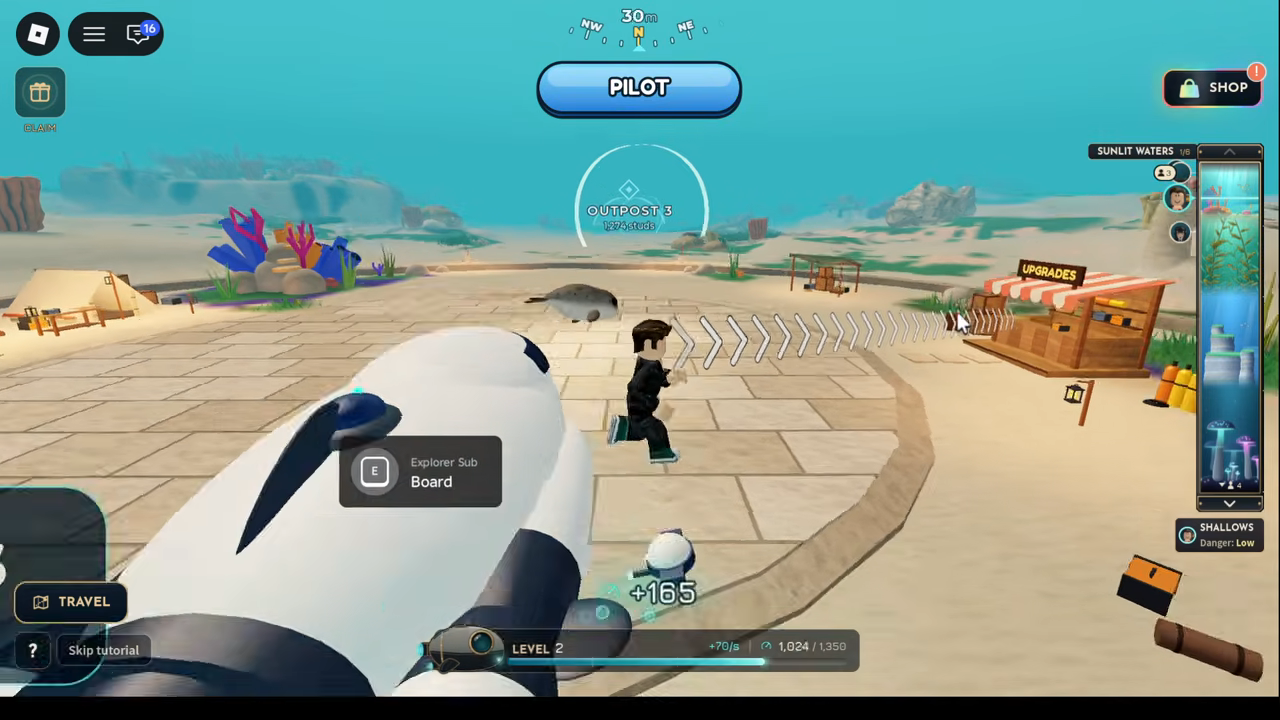
What reaching an outpost gets you
Every newly reached outpost gives you two things at once: safety and a free upgrade point. The store UI at the outposts spells it out — "Every new outpost earns 1 free upgrade point." So pushing to the next marker isn't just distance traveled; it's a guaranteed point you can spend, plus a safe spot to recover.
Quick answer
Spawn your submarine, hop in, and follow the outpost marker. At the outpost, step OUT of your submarine to earn Speed, then spend your free upgrade point at the Upgrade Store (press E at the upgrade stall).
- Each new outpost reached = 1 free upgrade point
- Speed is earned while outside your submarine at outposts
- The store improves Speed Gain, Upgrade Rate, Hull and Torpedo Damage
Earning Speed at an outpost
Once you're at an outpost, step out of your submarine. Speed is earned at outposts while your character is outside the sub — recorded play shows Speed award popups appearing while the character stands on the platform next to the boarded sub. Earned Speed levels you up, and leveling up makes you move faster, which in turn helps you reach the next outpost sooner.
The loop is self-feeding: travel to an outpost, step out to earn Speed, level up and move faster, then push on to the next marker. Your submarine also evolves into new forms every 5 levels, so the outposts you touch along the way keep paying off beyond the immediate upgrade point.
Spending your upgrade point at the store
At an outpost, walk up to the upgrade stall and press E when the "Upgrade Store / Open Store" prompt appears. Inside, spend your upgrade points on four tracks:
| Upgrade | What it does |
|---|---|
| Speed Gain | More Speed from each award |
| Upgrade Rate | Earn Speed more often (shorter time between awards) |
| Hull | More health for your submarine |
| Torpedo Damage | Each torpedo hits harder |
The first outpost makes this easy to learn: at Shallows Outpost 1, the store tells you "Your first upgrade is free: it uses 1 upgrade point, no Robux." The Speed Gain preview in that state showed +20 -> +40 Speed per award, and Upgrade Rate previewed Every 1.0s -> 0.9s. Keep in mind those previews are from one recorded player's state — the exact numbers shown at any store depend on where you are and what you've already bought, not a fixed schedule.
The store also has a RESEARCH tab alongside UPGRADES, which ties into collecting Research Data to unlock abilities.
Outposts as gates to deeper content
Outpost numbers do more than mark your route — some content is locked behind them. The pets panel shows which outpost you need to reach for each locked location:
| Locked content | Requirement shown in pets panel |
|---|---|
| Forgotten Valley | Reach Outpost 19 |
| Rootvaults | Reach Outpost 23 |
Route markers reflect the same numbering: OUTPOST 19 was visible in Forgotten Valley, which also carried a location badge reading "Danger: High", while Glowcap Forest's badge read "Danger: Safe" at an outpost-side position. So higher outpost numbers gate more content; observed regions differ in danger rating (Glowcap Forest showed Danger: Safe, Forgotten Valley Danger: High), but a complete region-to-danger pattern isn't established.
If things go wrong mid-dive
During a dive, a proximity prompt reading "E RETURN TO OUTPOST" can appear. Its exact trigger conditions and what it does weren't demonstrated in available footage, so treat it as an unconfirmed recovery option rather than a guaranteed always-on button.
Putting it together
- Spawn your submarine and hop in.
- Follow the outpost marker toward the next outpost.
- On arrival, enjoy the safety and collect your free upgrade point.
- Step out of the sub to earn Speed and level up.
- Press E at the upgrade stall and spend your point on Speed Gain, Upgrade Rate, Hull or Torpedo Damage.
- Repeat — deeper outposts unlock more content; observed regions differ in danger rating, but a complete region-to-danger pattern isn't established.
For the broader systems this ties into, see the progression guide, how to get speed, how to level up, and the upgrade points guide.
Related Guides
Earn and Spend Upgrade Points
Find free upgrade points at new outposts and learn what each Upgrade Store track improves.
How to Get Speed
Earn Speed by stepping out at outposts, then improve awards through Speed Gain and Upgrade Rate upgrades.
Underwater Areas and Outposts
Browse named regions, outpost requirements, and danger badges while understanding the limits of the available route overview.